Holiday gift guide template for small shops: a 12-page plan you can turn into a flipbook
A ready-made 12-page plan for your shop's holiday gift guide: what goes on each page, which page size to pick, and how to share it as a page-turning flipbook with a link and QR code.
Flipbook Maker TeamOct 20, 2026 8 min read
A holiday gift guide template is a ready-made page plan that groups your products into easy gift ideas, such as gifts by price, by person or by occasion. Fill each page with photos, short descriptions and prices, export it as a PDF, then turn it into a flipbook so shoppers can page through it on their phones from one link or QR code. Below is a 12-page template built for small shops, and the steps to share it for free with Flipbook Maker.
Key takeaways
- A good small-shop gift guide is 10–16 pages: cover, a welcome note, 6–10 gift pages, your key dates, and a "how to buy" page.
- Organize gifts the way shoppers think: by price ("under $25"), by person ("for the host") or by mood ("cozy nights in").
- Small Business Saturday is November 28, 2026 (SBA), the day after Black Friday (November 27). Aim to share your guide by early November.
- In a flipbook, pages are images, so links inside your PDF won't be clickable. Print your web address or a QR code on the pages, and add your website to the book's details.
- One flipbook gives you a link, a QR code and an embed code, so the same guide works in emails, social posts, in-store signs and on your website.
What is a holiday gift guide?
A holiday gift guide is a short, themed catalog that helps shoppers pick presents. Instead of showing everything you sell, it picks a few products and tells people who they're good for. For a small shop, that does two jobs: it makes deciding easy for customers, and it gives you one thing to share across email, Instagram, your counter and your website for the whole season.
A flipbook version is the same guide shown as a book with page-turn animation, opened in a web browser. Nothing to download and no app to install.
The 12-page holiday gift guide template
Use this as your page plan. Twelve pages fits most small shops; drop a gift page or two if you carry fewer products, or add more if you carry many.
| Page | What goes on it | Tip |
|---|---|---|
| 1 | Cover: shop name, "Holiday Gift Guide 2026", one hero photo | Keep the title big; it's what people see first on a phone |
| 2 | Welcome note: 2–3 sentences from the owner, plus your opening hours | A real signature or photo of you works better than a logo |
| 3 | Gifts under $25 | Stocking stuffers and teacher gifts sell fast |
| 4 | Gifts under $50 | Your best sellers in this range |
| 5 | For the host: candles, table goods, treats | Ties in with Thanksgiving and party season |
| 6 | For the one who has everything | Your most unusual or handmade items |
| 7 | For kids or for pets | Pick whichever your shop actually sells |
| 8 | Bundles and gift sets | Group 2–3 items at one price |
| 9 | Splurge gifts | 2–4 higher-priced pieces with a bit more story |
| 10 | Gift cards and gift wrap | Saves the last-minute shopper |
| 11 | Key dates: Small Business Saturday, last shipping day, holiday hours | Check your carrier's published holiday cut-off dates before printing them |
| 12 | How to buy: web address, QR code to your shop, address, phone, social handles | This page does the selling, so don't skip it |
On each gift page, keep to 3–6 products. Give each one a photo, a name, a one-line "why it's a good gift" and a price. Readers on phones see one page at a time, so a page with 12 tiny products is hard to read.
Tip: Number your products (1, 2, 3…) or give each one a short code. Shoppers can then message you "I'd like number 14" without hunting for a product link.
How to make the gift guide (Canva, Word or anything that exports a PDF)
You can build the pages in any tool you already use:
- Canva has free gift guide templates. Pick one, change the colors to match your shop, then download it as a PDF. Our guide to turning a Canva design into a flipbook covers the download settings.
- Word or Google Docs work too: one product group per page, then save or download as PDF. Flipbook Maker also accepts a Word .docx file directly.
- Photos only? You can skip the design tool and upload one JPG or PNG per page; the images become the pages in the order you choose.
Which page size? Pick one that matches where people will read it:
- Letter or A4 portrait if you'll also print copies for the counter.
- Square if most shoppers come from Instagram or Facebook.
- 9:16 portrait if you'll mostly share it in Stories and on phones.
How to turn your gift guide into a flipbook
- Go to Flipbook Maker and drop in your PDF (or your images or Word file). The conversion runs in your browser, and nothing is uploaded until you publish.
- Open Page options if you want to set the page size, the fit, margins or a background color. Set Quality to High if your guide has small text.
- Select Create flipbook and page through it to check the order and readability on a phone-sized window.
- Select Share & get a link, sign in with a free account and pick a link such as
flipbookmaker.online/maple-gifts-2026. - Keep it Public so shoppers can open it, fill in your shop name, website, email and phone in the book's details, then publish.
The full walkthrough, with screenshots, is in how to turn a PDF into a flipbook for free. If your guide is really a full product catalog, the small-business catalog guide goes further on layout.
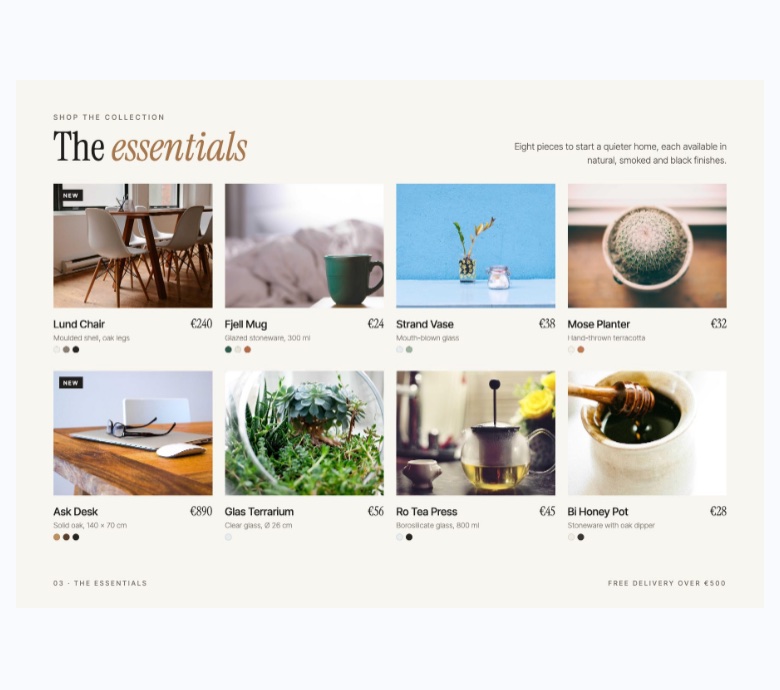
A catalog page in the flipbook reader on a phone (390 px wide). This sample book is landscape, so the page fits the screen width and shows quite small; portrait or square pages fill more of a phone screen.
Where should you share your gift guide?
Once it's published you get three things in the share panel: a link, a QR code (PNG download) and an embed code. Here's where each one is useful:
| Where | Use | How |
|---|---|---|
| Email newsletter | Link | Put the link behind a button such as "Flip through our gift guide" |
| Instagram / Facebook | Link | Link in bio or a Stories link sticker; post 2–3 pages as images to tease it |
| In your shop | QR code | Print it on a counter sign, receipt insert or the shopping bag |
| Your website | Embed code | Add it to a "Gift guide" page so visitors flip it without leaving your site (how to embed it) |
| WhatsApp / text | Link | Send it to regulars with a short personal note |
The owner page shows views per day (today, last 7 days, total), so you can see whether the newsletter or the Instagram post brought more readers that week.
What a flipbook gift guide can't do (and what to do instead)
Being clear about the limits saves you a reprint later:
- Product links inside the PDF aren't clickable. Each page becomes an image. Put a short web address or a QR code on the page itself, number your products, and use the "How to buy" page.
- Text isn't searchable inside the book, and the book itself isn't shown in Google results. Share the link directly, and add the guide's highlights as normal text on your own website if you want people to find them in search.
- You can't swap the PDF and keep the same link. If a price changes after you publish, you'll need to publish an updated book. Check prices and stock before you share.
- No checkout inside the book. Shoppers buy on your website, by message or in store, so make that step obvious.
Troubleshooting
- Text looks small on phones: use fewer products per page, larger fonts (about 12 pt or more for body text on a Letter page), and set Quality to High in Page options before creating the flipbook.
- White borders around pages: turn on Trim empty borders, or set the fit to Fill in Page options.
- Pages in the wrong order (images): rename files 01, 02, 03… before uploading, or drag the page cards into the right order before creating the book.
- A two-page spread looks odd: phones in portrait show one page at a time, and wider screens show a spread. Design every page to stand on its own.
When should you launch your holiday gift guide?
Earlier is better. Many shoppers start looking in October and early November, and your guide needs time to circulate before the busy weekend of Black Friday (November 27, 2026) and Small Business Saturday (November 28, 2026). A simple plan:
- Late October: finish pages and photos; publish the flipbook.
- Early November: send it to your email list, pin it on Instagram, put the QR code at the till.
- The week of Thanksgiving: re-share it with your holiday hours and key dates.
- Mid-December: share it once more, pointing to gift cards and your last shipping day.
FAQ
Is there a free holiday gift guide template?
Yes. The 12-page plan above is free to copy, and Canva has free gift guide designs you can edit. Make the pages in any tool, export a PDF, and turn it into a flipbook with Flipbook Maker for free.
How many products should a gift guide have?
For a small shop, 20–40 products across 6–10 gift pages is plenty. Three to six products per page keeps each page readable on a phone.
Can shoppers click the products in my flipbook?
No. Flipbook pages are images, so links in your PDF don't carry over. Print a short URL or QR code on the pages, and add your website to the book's details so it appears in the reader.
Is a flipbook gift guide free?
Yes. Flipbook Maker is free, puts no watermark on your pages, and you can publish as many books as you like with a free account. A small "Made with Flipbook Maker" badge appears next to the book, not on the pages.
Can I print the same gift guide?
Yes. Print the PDF you designed. Choose Letter or A4 size if you plan to print, and add the flipbook's QR code to the printed copy so people can open the digital version too.
Can I update the guide after publishing?
You can edit the title, link, visibility and details, but not swap the PDF inside a published book. For new prices or products, publish an updated version and share the new link.
Summary
Plan your holiday gift guide around how people shop: by price, by person and by mood. Keep it to about 12 pages, and end with a clear "how to buy" page. Export it as a PDF, turn it into a flipbook, and share one link, QR code and embed code everywhere from your newsletter to your counter, ideally by early November. Start your gift guide flipbook. It's free.